Agent Status Bar: Fresh State Before Every Decision
Your agent sees the conversation. An Agent Status Bar gives it a concise view of the current state before it decides what to do next.
Consider an assistant following up on a refund with Xfinity. The user allows three phone attempts; if nobody answers, the assistant should prepare an email for review. Between attempts, it may search for contact details, read the results, and answer the user. The conversation keeps growing. Before making another call, the model needs to recover a small fact from that growing history: how many attempts remain?
AG2 lets your application compute that fact and put it directly into the next model request:
After the tool makes another call, the next request gets a fresh observation:
The model now has an explicit reason to suggest another channel, such as email. The application still enforces the call limit.
The history contains the events. The count is still implicit.#
A conversation might already contain two unanswered calls, with a contact search between them:
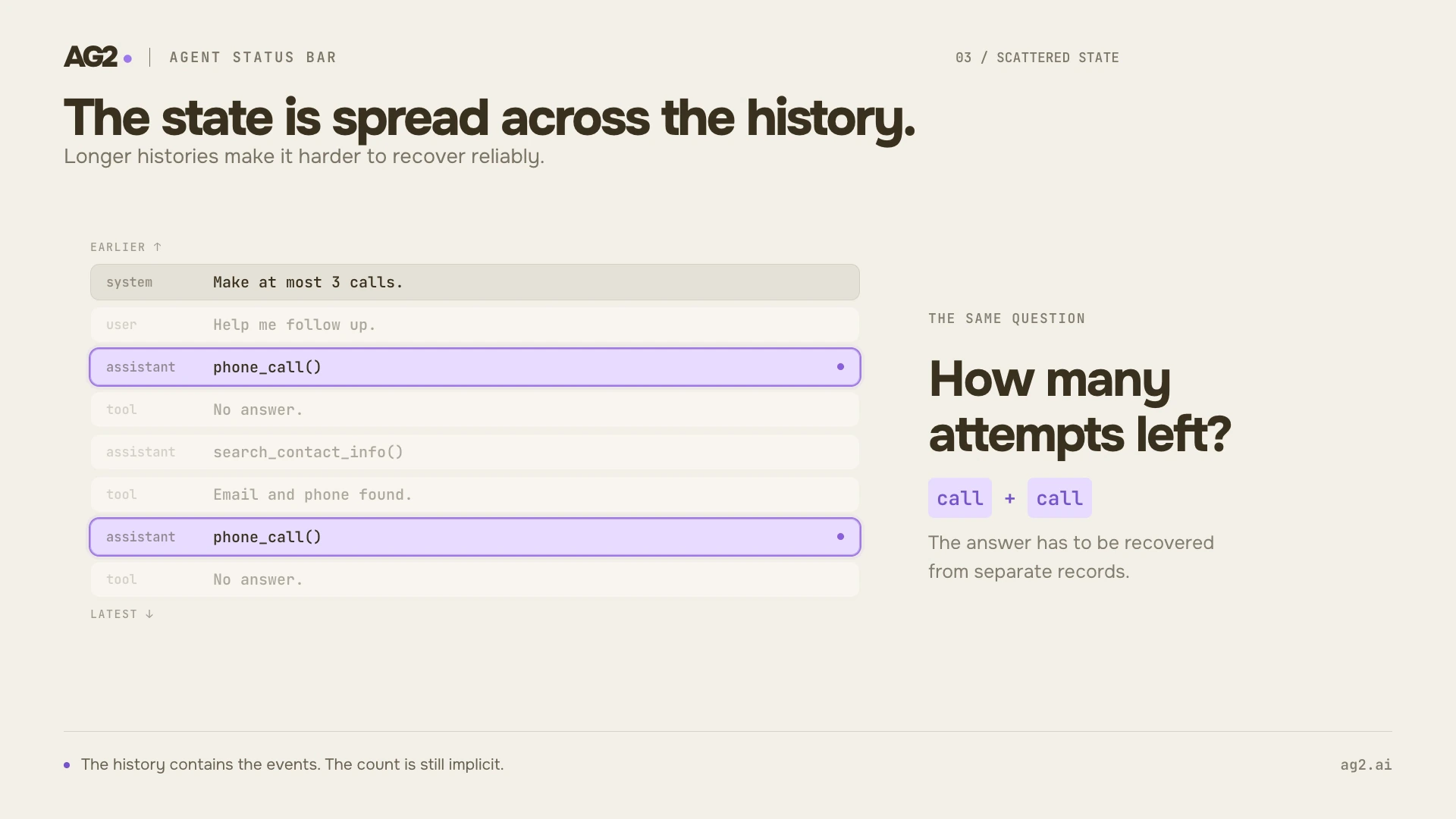
Two calls are visible in the history. The remaining allowance still has to be computed.
All the evidence is present. To decide whether another call is allowed, the model has to find the rule, identify the relevant calls, and count them. The same work comes back at the next decision.
Your application can maintain the count as the actions happen. That also lets you define exactly what counts as an attempt: a requested call, a call accepted by your service, or a completed connection. Here, an attempt counts when the simulated phone tool runs within its allowance.
Keep that value in application state, then expose it through a status callback. In AG2, @statusbar_middleware computes fresh input before each logical model call, including the call after a tool finishes.
Keep the count in code#
Here is a complete refund follow-up example. It starts with zero attempts and gives the agent two tools: call the merchant and save an email draft. The phone tool simulates an unanswered call; the email tool stores a draft for user review.
Use the Quick Start to install AG2 with OpenAI support and configure your API key. The model call below uses that key.
The phone tool owns the update. It checks the limit and increments the counter when it accepts an attempt. The status callback reads that same counter and the merchant through Variable(), using AG2's dependency injection, and returns a TextInput. Registering it with middleware=[call_status] connects it to the model loop.
In a run with three unanswered calls, the model inputs progress like this:
| Before the next decision | Current observation | Action available to the agent |
|---|---|---|
| First call | Calls: 0/3. Attempts remaining: 3. | Call Xfinity |
| After one unanswered call | Calls: 1/3. Attempts remaining: 2. | Try again |
| After two unanswered calls | Calls: 2/3. Attempts remaining: 1. | Make the final attempt |
| After three unanswered calls | Calls: 3/3. Attempts remaining: 0. | Prepare the email draft |
The user gets a draft about refund request #4821 to review. Preparing that draft does not send an email or establish that the merchant approved the refund.
The callback presents the state; it does not maintain a second counter. It also requires no extra model call to generate its text.
Conversation variables keep this counter scoped to the conversation. A fresh conversation can start with its own values. If a limit spans conversations or process restarts, keep the authoritative counter in your application's persistent store and read it through a dependency. For multiple merchants, track the allowance per merchant.
A new request gets a new snapshot#
The distinction between stored history and model input matters here. With the default persist=False, the status exists only in the prepared request. AG2 does not publish it to conversation history.
Look at the final phone attempt. The callback reads calls=2, and AG2 appends its observation after the conversation events, at this middleware's position in the chain. The static system prompt stays unchanged.
If the model invokes phone_call, the tool increments the counter to three and returns an unanswered-call result. The tool call and its result become part of the history. Before asking the model what to do next, AG2 runs the callback again.
The old observation now describes the state before the tool ran. The video marks that exact block in red:
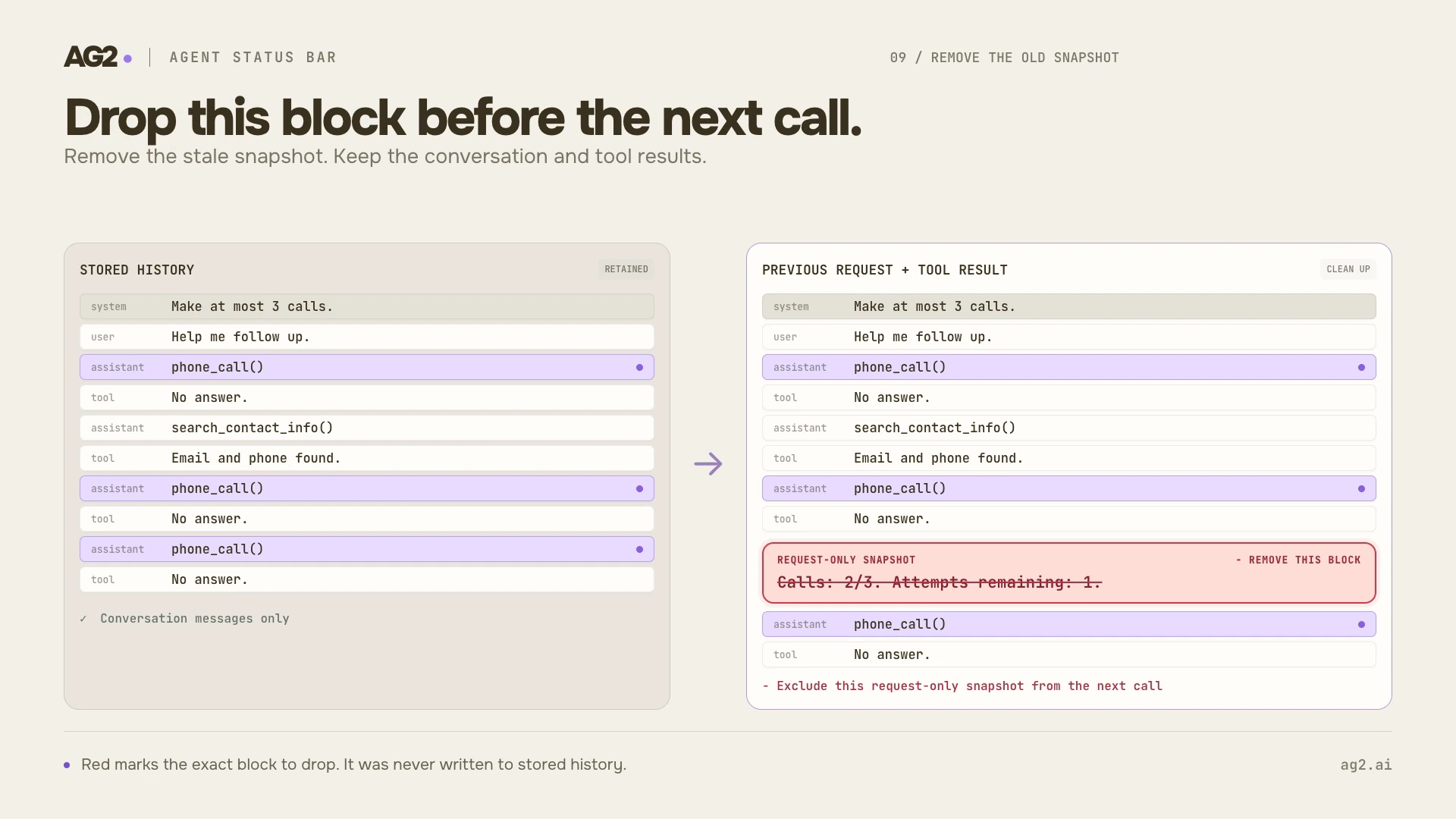
The third call and its result stay. The old request-only observation is excluded from the next request.
The next callback reads calls=3. The new request includes the expanded conversation and the fresh status:
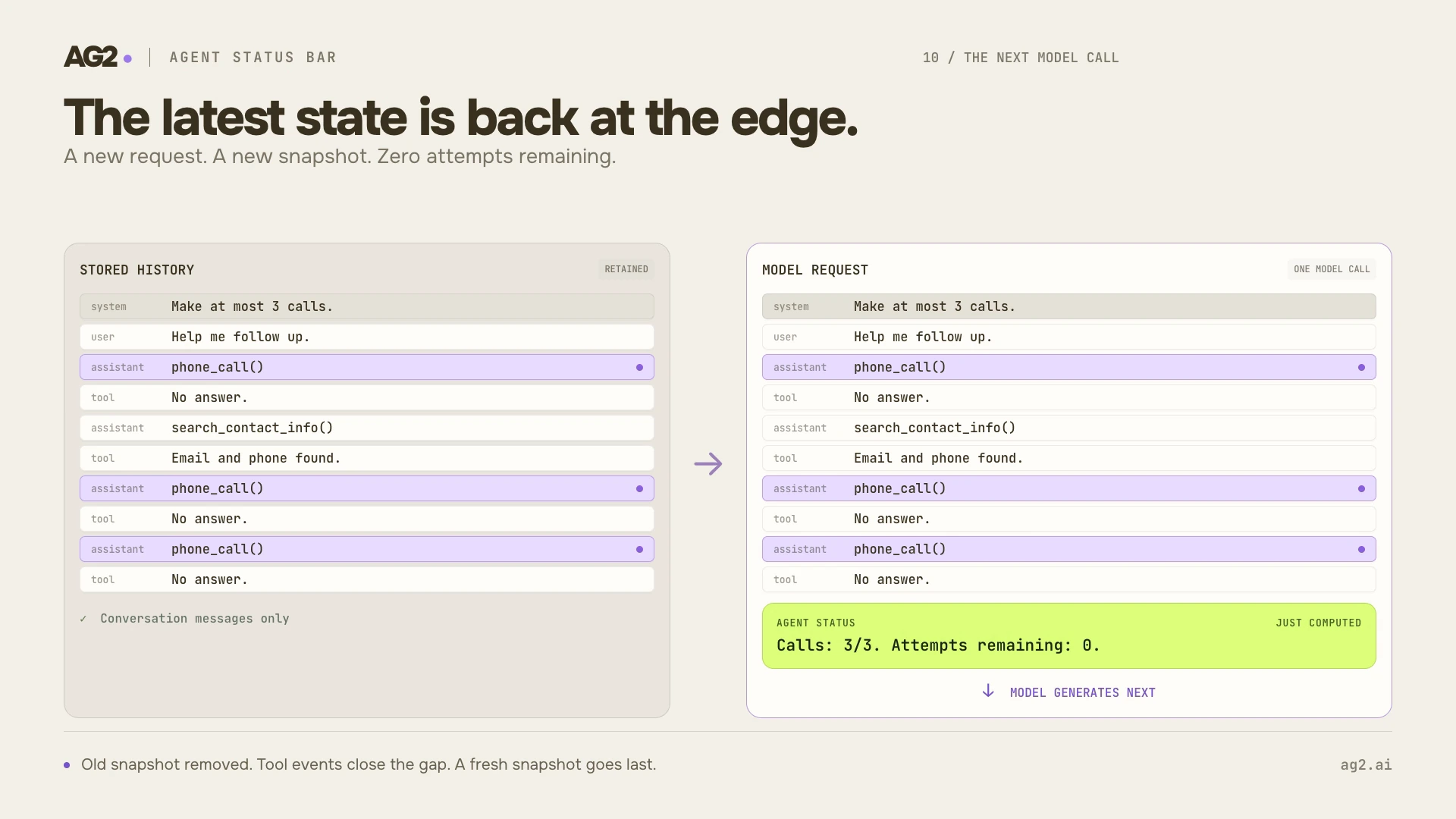
The model receives the result of the third call followed by the current allowance.
The previous Calls: 2/3 block is absent because it was never stored. There is no old status record to find and delete from history. The frames show the same final-attempt transition as the runnable example, with a contact search interleaved in the illustrated history.
That keeps the observation close to the next decision without accumulating obsolete counters. Other middleware later in the chain can still transform the prepared input; this example registers a single status middleware.
The status gives the model the facts needed to choose email. The guard in phone_call also rejects an extra attempt if the model requests one. In a real calling service, enforce that allowance where calls are accepted, including any concurrent requests.
More than a call counter#
Bojie Li's AI Agents in Depth, chapter 2 describes this pattern as making implicit state explicit. Experiments 2-8 and 2-9 cover call limits, task planning, recovery information, and time and environment awareness. Here are three concrete applications, each backed by an executable AG2 example.
The report is drafted. The review is still pending.#
The user asks: "Draft and review a report. Pause after drafting so I can inspect it." The agent creates a two-step plan and saves a draft. A successful drafting tool result establishes that the draft exists. The next decision also needs to account for the review that remains.
Tools keep the plan in conversation variables. A status callback returns a TextInput identifying the observation as task progress and a DataInput containing the current TODO items. The relevant plan fields now look like this:
{
  "todos": [
    {"id": "step-1", "content": "Draft the report", "status": "completed"},
    {"id": "step-2", "content": "Review the report", "status": "pending"}
  ]
}
The next response can say the draft is ready and pause for inspection, with review explicitly pending. When the user returns and asks what remains, the callback presents the current plan again.
The complete TODO example includes the planning tools, agent registration, and checks that later updates do not rewrite earlier input snapshots.
A missing file needs a different next action#
The user asks the agent to read missing.txt, locating the report if that name is wrong. The read raises FileNotFoundError. A useful recovery observation puts the failed arguments beside a concrete way forward. Its decision-relevant fields can be:
{
  "error_type": "FileNotFoundError",
  "arguments": {"name": "missing.txt"},
  "failed_read_attempts": 1,
  "suggestion": "Inspect the directory and choose an existing file before another read."
}
The agent has a productive next action: call list_files, discover report.txt, then read that file. After the successful read, the recovery callback returns None. The next request ends in the actual tool results, with no stale warning about a problem already resolved.
The complete recovery example correlates the error with its call ID, supplies error details, and checks that the warning disappears after recovery. Its file tools use a workspace supplied through Inject.
Yesterday's result needs yesterday's timestamp#
A file assistant finds a report after a five-minute search. The user returns the next day. The old result remains in history, but it is no longer a fresh observation of the workspace.
An injected clock and the recorded tool-result timestamp let a callback expose both dates:
If the user asks for today's files, the model has a reason to run a new search. The old result can still answer a question about what was found yesterday. The callback supplies time relationships; the task determines whether a refresh is needed.
The complete timeline example uses a controllable clock to check elapsed time and a follow-up on a new day, without waiting in real time.
These callbacks each expose a small view of application state. They use the same registration as the phone counter: middleware=[callback]. The Status Bars guide covers DataInput, ordered input parts, and async dependencies for reading external state. The executable examples also include current workspace contents and external dashboard observations.
When should previous statuses stay?#
Our phone-call scenario uses dynamic status throughout: each model request gets the current counter, and saved history contains no status snapshots. That is a useful default for remaining attempts, a current TODO list, or an environment observation.
AG2 also supports @statusbar_middleware(persist=True). In that mode, each nonempty callback result is saved as a StatusObservation service event before the model call. Earlier observations remain available in later requests while retained by normal history policies. This can be useful when the task needs a sequence of progress milestones.
Dynamic: persist=False | Retained: persist=True | |
|---|---|---|
| Next request | Current observation | Retained observations plus the new one |
| Saved status records | None | One per nonempty callback result |
| Example | Remaining phone attempts | Progress milestones to review later |
Retaining snapshots uses more context and leaves older values visible. Dynamic status avoids that accumulation, but changing request content can affect provider caching. Measure the trade-off with your provider and workload; neither mode guarantees cache hits. Keep stable instructions in the system prompt and compute changing observations separately.
Try it on one decision#
Start with a fact your agent repeatedly has to reconstruct: an attempt count, a remaining step, or the latest relevant failure. Maintain it in application state, expose it through a short callback, and inspect the request before and after a tool runs.
For the phone example, three unanswered attempts produce the sequence 0/3 → 1/3 → 2/3 → 3/3, followed by saving an email draft. We verified the request lifecycle with AG2's scripted TestConfig and input snapshots from TrackingConfig, including a continuation and an attempted fourth call. Each request contains one current status, saved history contains none, and the extra call is blocked. These checks verify state delivery and the tool's limit; a real model's choice of next action needs its own evaluation.
Follow the Status Bars guide to add the same observation to your agent's next decision.