Skip to content

2026#

Give Your AG2 Agent its own UI with AG-UI

AG2 x AG-UI

You've built an agent with AG2. It reasons, calls tools, and streams responses. But right now it lives in a terminal or a script. The moment you want to put it in front of a user (like for a blog, perhaps) and stream text token by token, show tool activity as it happens, and handle errors gracefully you're building custom plumbing: WebSocket handlers, bespoke JSON formats, state synchronization logic.

AG-UI (Agent-User Interaction Protocol) is an open, lightweight, event-based protocol that standardizes this agent-to-UI layer. AG2 now supports AG-UI natively, meaning you can connect any ConversableAgent to an AG-UI-compatible frontend with just a couple of lines of code.

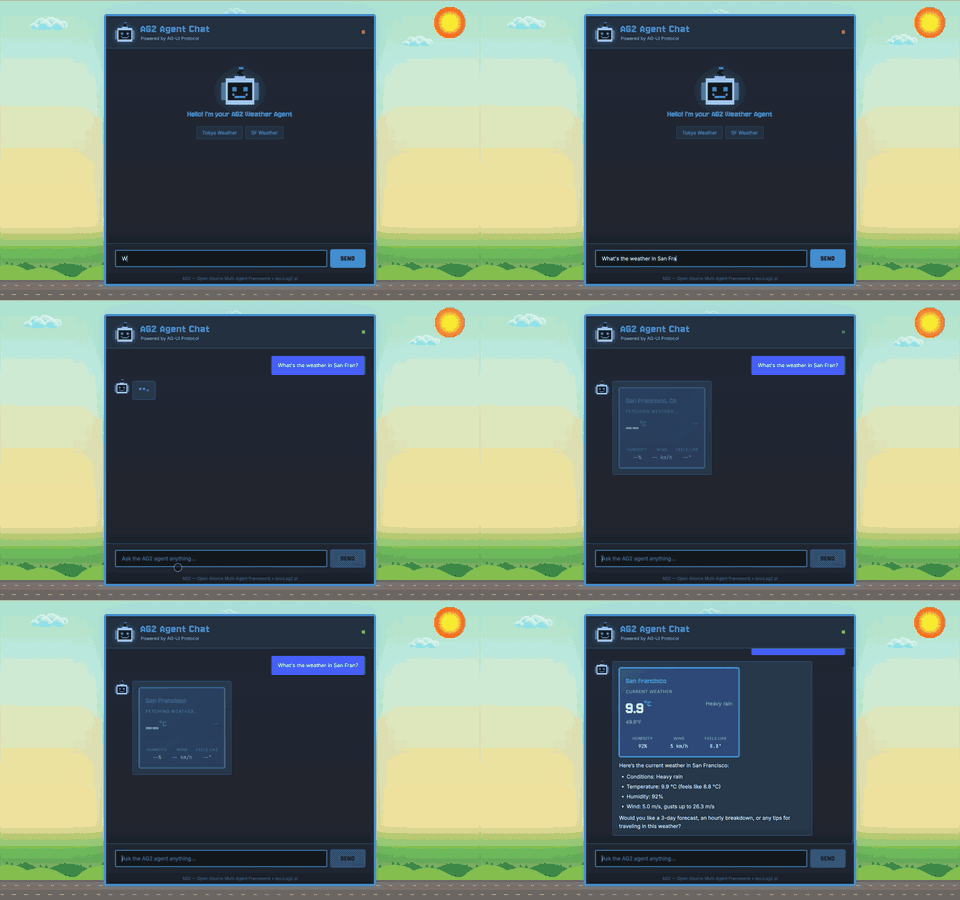
In this post, we'll look under the hood at how the protocol works by building a working agent chat application from scratch using a ConversableAgent with a weather tool, sending AG-UI events to a browser frontend that renders streaming text and an interactive tool card. Simple HTML, no frontend framework required.

AG2 Agent Chat powered by AG-UI

AG2 OpenTelemetry Tracing: Full Observability for Multi-Agent Systems

AG2 OpenTelemetry Tracing

Multi-agent systems are powerful -- but when something goes wrong, figuring out where and why is painful. Which agent made the bad decision? Was the LLM call slow, or did the tool fail? How many tokens did that group chat actually use?

AG2 now has built-in OpenTelemetry tracing that gives you full visibility into your multi-agent workflows. Every conversation, agent turn, LLM call, tool execution, and speaker selection is captured as a structured span -- connected by a shared trace ID and exportable to any OpenTelemetry-compatible backend.

Key highlights:

  • Four simple API functions to instrument agents, LLM calls, group chats, and A2A servers
  • Hierarchical traces that mirror how agents process conversations
  • Distributed tracing across services using W3C Trace Context propagation
  • Works with any backend -- Jaeger, Grafana Tempo, Datadog, Honeycomb, Langfuse, and more
  • Follows OpenTelemetry GenAI Semantic Conventions for standard interoperability